
CarpodGo T4 Review: A Clever Way to Add Apple CarPlay to Your Car
Published on 17 November, 2026
We put the CarpodGo T4 to the test to see if this clever little gadget is worth the investment.
Overview
Would you like Apple CarPlay or Android Auto in your car without having to replace your entire infotainment system? The CarpodGo T4 could be a clever solution, offering a modern touchscreen experience that works in almost any car. But is it worth adding another screen to your dashboard?
CarpodGo T4 Review: A Clever Way to Add Apple CarPlay to Your Car
Would you like Apple CarPlay or Android Auto in your car without having to replace your entire infotainment system? The CarpodGo T4 could be a clever solution, offering a modern touchscreen experience that works in almost any car. But is it worth adding another screen to your dashboard?
What is the CarpodGo T4?
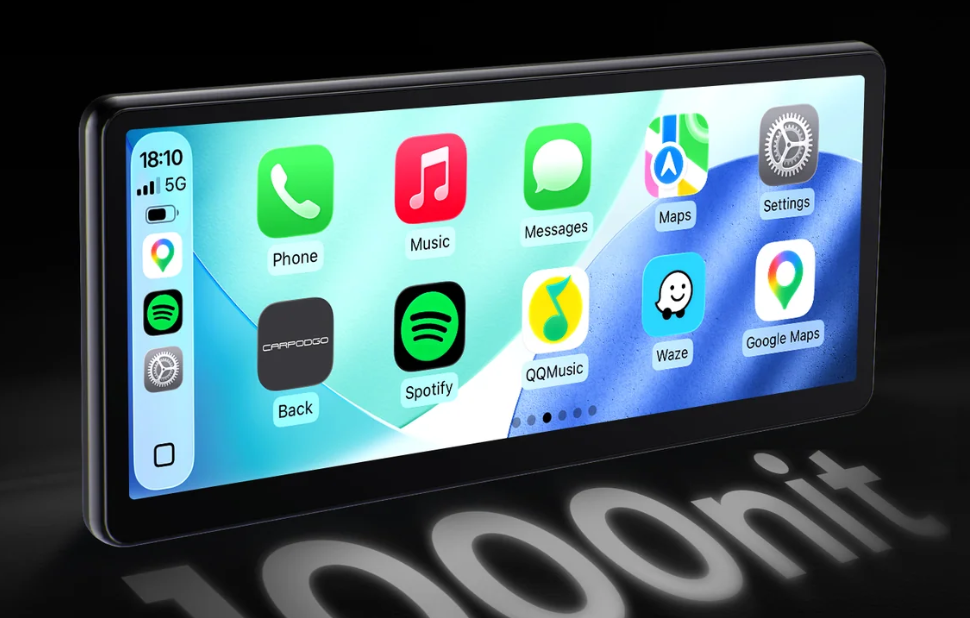
The CarpodGo T4 is a portable infotainment display designed to bring wireless Apple CarPlay and Android Auto to cars that don't already have them.
It's a particularly interesting option for anyone driving an older car with a basic radio or Bluetooth connectivity but no proper touchscreen. Rather than spending a fortune upgrading the car's existing system, you can simply mount the CarpodGo on your dashboard, connect your phone and access many of your favourite apps on a dedicated display.
And it's a pretty impressive screen, too. The T4 features a high-resolution 1920 × 720 display, 60fps wireless CarPlay and up to 1,000 nits of brightness, meaning it should remain easy to see even on sunny days.
How easy is it to set up?
The good news is that getting the CarpodGo T4 up and running is relatively straightforward.
It does need a power source, and in our case that meant plugging it into the car's 12V socket, so you'll need to factor in having a cable running across your dashboard.
The included mounting options are handy, particularly the adhesive pads, although there is one thing worth mentioning. This is a fairly substantial screen, and we found it was important to position it somewhere the bottom could rest securely on the dashboard rather than relying entirely on the suction mount to support its weight.
Once you've found a suitable position, the magnetic quick-release mounting system is a nice touch, allowing you to remove the display without having to disconnect everything.
Connecting the phone itself was easy enough, although getting the audio set up was a little fiddly initially. There was a bit of trial and error involved in getting the sound to play through the car's existing speakers, but once we'd figured it out, everything worked as expected.
What's it like to use?
If you've used Apple CarPlay before, you'll feel right at home.
The interface is familiar, with easy access to your music, navigation, messages and phone calls, all displayed on a bright, responsive touchscreen.
Spotify is particularly handy, making it much easier to browse playlists, skip tracks and manage your music without reaching for your phone.
You can also make and receive calls and have incoming WhatsApp messages read aloud, which is a useful feature when you're on the move.
Screen quality is another strong point. Everything looks sharp and clear, and the display feels like a proper piece of modern infotainment technology rather than a cheap aftermarket accessory.
Google Maps is where it really shines
For us, the biggest selling point of the CarpodGo T4 is Google Maps.
Even if your car already has a built-in satellite navigation system, there's a good chance Google Maps will offer a much better experience.
The interface is familiar, destinations are easy to search for, and you have the benefit of live traffic information, alternative routes and up-to-date mapping.
Having all of that displayed on a large, bright screen makes a real difference, particularly if you're used to relying on your phone for directions.
In fact, we'd go as far as saying that Google Maps alone could make the CarpodGo worth considering, especially if your existing sat nav is a little dated or awkward to use.
Is there anything we didn't like?
Our biggest reservation isn't really about the CarpodGo itself, but rather whether everyone actually needs one.
If your car already has a reasonably decent infotainment screen, adding another display to the dashboard can feel like unnecessary clutter.
Between the screen, its mounting system and the power cable, it does take up a fair bit of space, and while the functionality is good, the improvement over an existing modern system might not be enough to justify it.
That's why we think the ideal customer is someone whose car already has Bluetooth connectivity and a decent sound system, but no Apple CarPlay or Android Auto.
In that situation, the CarpodGo makes much more sense. You're effectively giving an older car a modern infotainment upgrade without having to make any permanent modifications.
What about the reversing camera?
Another useful feature is the option to add a 1080p rear-view camera.
For anyone driving an older car without a reversing camera, this could make the package even more appealing, combining modern smartphone connectivity with an additional parking aid.
It's worth checking which package you're buying, as the camera is an optional extra rather than necessarily being included with every T4.
How much does the CarpodGo T4 cost in Ireland?
The CarpodGo T4 is available to order directly from the official CarpodGo website, with prices starting at $229.90 (approximately €200) at the time of writing.
There's also a larger T4 Plus available, measuring 10.9 inches compared with the standard T4's 8.9-inch display.
CarpodGo advertises free worldwide shipping, including to Ireland, although it's worth checking the final checkout price and delivery arrangements before ordering.
As the company ships internationally, Irish buyers should also confirm whether VAT and any applicable import charges are included. Otherwise, additional charges may apply on delivery.
At around €200, it's not the cheapest aftermarket CarPlay solution available, but the excellent screen quality and ease of use help justify the price, particularly if you're looking to modernise an older car without replacing its existing stereo.
CarpodGo T4: Our verdict
So, is the CarpodGo T4 a clever fix in a world where Apple CarPlay and Android Auto have become almost essential features?
We think so.
It's easy enough to install, the screen quality is excellent and it brings a genuinely useful range of modern features to cars that might otherwise be missing out.
There are a few compromises. The audio setup took a little patience, it needs a constant power connection and finding the right mounting position is important.
And if you already have a decent touchscreen with smartphone connectivity, it's probably not going to transform your driving experience enough to justify the extra clutter.
But for someone driving an older car with Bluetooth and no proper infotainment display, it's a very clever upgrade.
Most importantly, the Google Maps experience is excellent, and that alone could make it worth the investment.
The bottom line? You don't necessarily need a new car to enjoy some of the best technology found in one. The CarpodGo T4 is a relatively simple way to bring your dashboard up to date.


Connect With Us


Our Mobile App

